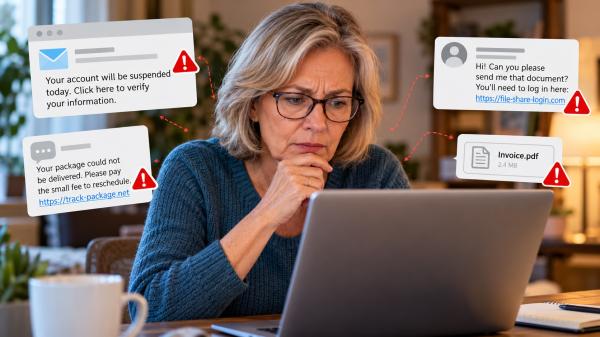
You receive an email warning that your bank account will be suspended unless you verify your information. A text message claims a package cannot be delivered until you pay a small fee. Another message appears to come from someone you know.
These messages may look ordinary, but they could be phishing attempts.
Phishing is a type of online fraud designed to trick people into revealing personal information, sending money, or giving criminals access to their accounts. The messages often look convincing and create pressure to respond quickly.
Learning to recognize the warning signs can help you protect your information and make safer decisions online.
What Is Phishing?
Phishing happens when someone impersonates a trusted person, company, or organization to deceive you. The goal is usually to steal sensitive information or persuade you to take an unsafe action.
Criminals may seek your email password, bank account details, credit card number, Social Security number, or account verification codes. They may also try to get you to download harmful software.
Phishing commonly occurs through:
- Emails: Messages pretending to come from banks, retailers, utility companies, or other familiar organizations.
- Text messages: Alerts about deliveries, account problems, unpaid fees, or suspicious transactions.
- Social media: Messages from fake profiles or compromised accounts.
- Phone calls: Calls from people claiming to represent legitimate businesses or institutions.
Some phishing messages contain obvious mistakes. Others use professional language, familiar logos, and convincing details. Appearance alone cannot establish whether a message is genuine.
7 Warning Signs of a Phishing Attempt
Recognizing phishing becomes easier when you know what to look for. These seven warning signs can help you decide when to stop and verify a message.
1. The Message Creates a Sense of Urgency
Scammers often want you to act before you have time to think.
A message might claim your account will close today, your payment has failed, or someone has accessed your account. It may insist that you respond immediately to avoid a problem.
Urgency alone does not prove fraud. However, an unexpected demand for immediate action deserves careful attention.
Instead of clicking a link, open the company’s official website or app independently. Check whether the problem actually exists.
2. The Sender’s Address Looks Unusual
A message may display a familiar company name while coming from an unrelated email address.
Look carefully for misspellings, extra characters, unfamiliar domains, or addresses that do not match previous legitimate communications.
The sender’s display name is not enough to establish authenticity. Even a familiar name can appear in a fraudulent message.
If something seems unusual, contact the organization through a trusted channel rather than replying.
3. The Message Includes an Unexpected Link
Phishing messages frequently encourage recipients to click links to verify accounts, receive packages, claim rewards, or resolve billing problems.
Before opening a link, consider whether you expected the message and whether the request makes sense.
On a computer, you can often hover over a link to preview its destination without opening it. On a phone, avoid tapping suspicious links just to inspect them.
The safest option is to navigate to the organization’s website yourself or use its official app.
4. It Requests Sensitive Information
Be cautious when an unexpected message asks for your password, bank details, Social Security number, or verification code.
Criminals may use this information to access accounts, make unauthorized transactions, or commit identity theft.
Never share a one-time login code with someone who contacts you unexpectedly. A caller or message claiming to represent your bank does not automatically deserve your trust.
If a request concerns an account you actually use, verify it independently before providing information.
5. It Contains an Unexpected Attachment
An email attachment may appear to be an invoice, receipt, document, or account statement.
However, unexpected files can contain harmful software or lead to fraudulent websites. Opening them may expose your device or information to risk.
If you were not expecting the file, confirm with the sender through a separate, trusted communication channel before opening it.
6. Something About the Message Does Not Add Up
Watch for unusual wording, inconsistent company details, strange formatting, or requests that do not match the organization’s normal procedures.
For example, a message may claim to confirm a purchase you never made or demand payment for a delivery you did not order.
Still, do not rely on spelling mistakes alone. Some fraudulent messages are carefully written and difficult to distinguish from legitimate communications.
7. The Message Does Not Match Your Recent Activity
An unexpected delivery notice, purchase confirmation, or account alert should prompt you to check the details.
Ask yourself whether you recently placed an order, requested a password reset, or contacted the organization.
If you have no connection to the supposed activity, treat the message cautiously. If you do have an account with the company, verify the situation through its official website or app rather than using the message’s links.
Common Examples of Phishing
Phishing can take several forms. Understanding familiar scenarios can help you recognize suspicious requests.
A fake bank alert: You receive a message claiming that your account has suspicious activity. It directs you to a link to confirm your identity. Instead, open your banking app or call the number on your bank card.
A fraudulent delivery notice: A text claims your package is delayed and requests a small payment. If you are expecting a delivery, check its status through the retailer or shipping company’s official website.
A fake company email: An email says your subscription or utility payment has failed. Rather than following the supplied link, check your account directly through the company’s established website.
A message from someone you know: A friend appears to send an unexpected invitation or document that requires your email password to open. Contact that person through another channel to confirm the request.
These examples illustrate why familiarity is not proof of legitimacy. Scammers can impersonate organizations and people you recognize.
How to Protect Yourself From Phishing
A few consistent habits can make it harder for scammers to obtain your information.
- Pause before responding. Unexpected messages that demand immediate action deserve extra scrutiny.
- Verify the sender independently. Use a website, app, or phone number you already trust.
- Avoid suspicious links and attachments. Do not open unexpected files or follow unverified instructions.
- Use strong, unique passwords. A password manager can help you create and manage them.
- Enable multifactor authentication. This adds another verification step when signing in and can make unauthorized access more difficult.
- Keep your devices updated. Install security updates for your phone, computer, browser, and other software.
- Report suspicious messages. Use your email provider’s reporting tools or the appropriate official reporting service.
These practices follow guidance from the Federal Trade Commission (FTC) and the Cybersecurity and Infrastructure Security Agency (CISA).
What Should You Do If You Click a Phishing Link?
First, do not panic. Clicking a link does not automatically mean your accounts have been compromised. Your next steps depend on what happened.
If You Clicked but Entered No Information
Close the suspicious page and avoid further interaction. If you downloaded a file or suspect harmful software was installed, update your security software and run a scan.
Watch for unusual device behavior or account activity. If you are unsure whether the device is safe, seek help from a trusted technical professional.
If You Entered a Password
Go directly to the legitimate service and change the compromised password. If you reused it elsewhere, change it on those accounts as well.
Enable multifactor authentication if available. Check recent sign-in activity and sign out unfamiliar sessions when the service provides that option.
If the compromised account is your email, secure it promptly because criminals may use it to reset passwords on other accounts.
If You Shared Financial or Personal Information
Contact your bank or financial institution through a verified phone number or official app if you shared financial details or notice unauthorized transactions.
If you exposed your Social Security number or other identifying information, visit IdentityTheft.gov for guidance tailored to your situation.
Acting quickly can help limit potential damage. You do not need to wait until you see evidence of fraud before taking reasonable protective steps.
Where Can You Report Phishing?
If you receive a suspicious message in the United States, several official resources can help.
- Federal Trade Commission: Report scams and fraudulent activity at ReportFraud.ftc.gov.
- Suspicious text messages: Forward unwanted scam texts to 7726 (SPAM) when supported by your mobile carrier. You can also use your phone’s reporting feature.
- Suspicious emails: Forward phishing emails to reportphishing@apwg.org, the Anti-Phishing Working Group’s reporting address.
- Identity theft: Visit IdentityTheft.gov if someone has misused your personal information.
After reporting a suspicious message, delete it and avoid responding to the sender. Do not click links in the message, including links presented as an unsubscribe option.
A Simple Rule for Safer Online Communication
Phishing works by making an unsafe request appear trustworthy. The message may look familiar, sound professional, or create concern about an account you depend on.
You do not need to identify every trick immediately. The most useful habit is to pause whenever an unexpected message asks you to click a link, provide personal information, or act under pressure.
Verify the request through a channel you trust. If you have already responded, take the appropriate steps to secure your accounts and report the incident.
A moment spent checking a message can help protect information that would be much harder to recover.
- What Is Phishing?
- 7 Warning Signs of a Phishing Attempt
- 1. The Message Creates a Sense of Urgency
- 2. The Sender's Address Looks Unusual
- 3. The Message Includes an Unexpected Link
- 4. It Requests Sensitive Information
- 5. It Contains an Unexpected Attachment
- 6. Something About the Message Does Not Add Up
- 7. The Message Does Not Match Your Recent Activity
- Common Examples of Phishing
- How to Protect Yourself From Phishing
- What Should You Do If You Click a Phishing Link?
- If You Clicked but Entered No Information
- If You Entered a Password
- If You Shared Financial or Personal Information
- Where Can You Report Phishing?
- A Simple Rule for Safer Online Communication