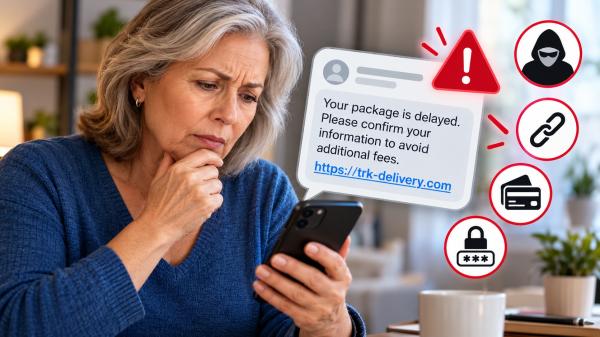
A text message arrives saying your package is delayed. Another warns that your bank account needs attention. Both include a link and ask you to act quickly.
Before tapping, take a moment to check the message. Scammers often impersonate familiar businesses and government agencies to trick people into visiting fake websites or sharing personal information. Some messages even appear to relate to purchases or services you actually use. The Federal Trade Commission (FTC) recommends avoiding links in unexpected texts and verifying messages through contact information you already trust.
A few simple habits can help you spot suspicious messages and make safer decisions.
1. Check Who Sent the Message
Start by asking yourself whether you expected the text.
Were you waiting for a delivery? Did you recently contact your bank? Have you signed up for an account notification?
An unexpected message deserves extra attention, especially when it asks you to click a link or provide information.
However, an unfamiliar number does not automatically mean a message is fraudulent. Some legitimate businesses use automated messaging services. Likewise, a familiar company name does not guarantee that a message is genuine.
Scammers can impersonate organizations and people you recognize. They may also use personal details to make a message seem convincing.
What to do: If the message claims to come from a company you use, check your account through its official website or app. Do not use the contact details or links supplied in the suspicious text.
2. Look for Warning Signs
Fraudulent messages often try to create a sense of urgency. They may claim that you must act immediately to prevent a problem or receive a benefit.
Watch for these common warning signs:
- Unexpected problems: A message claims your account has been locked or your payment has failed.
- Urgent demands: The sender threatens a penalty, service interruption or other consequence unless you act quickly.
- Unexpected fees: You are asked to pay a small delivery charge or an alleged unpaid toll.
- Requests for sensitive information: The message asks for your password, bank details, Social Security number or verification code.
- Surprise rewards: You are told that you have won a prize or qualify for a refund you did not request.
- Unfamiliar links: The message directs you to a web address you do not recognize.
These signs do not prove that a message is fraudulent, but they are reasons to stop and verify it.
Be cautious even when the wording looks professional. A message can contain correct spelling, a company logo or personal details and still be a scam.
3. Examine the Link Without Opening It
Before clicking, look at the web address shown in the message, if your phone displays one.
Watch for misspelled company names, unexpected domain endings, shortened URLs or addresses that do not match the organization the sender claims to represent.
For example, a link may contain a familiar company name but lead to an unrelated website. The name alone does not establish that the destination is legitimate.
Some phones allow you to press and hold a link to preview its destination. However, avoid opening the link just to investigate it. If you are unsure how your device handles previews, skip this step and verify the message independently.
Also, remember that HTTPS does not prove a website is trustworthy. It indicates that the connection is encrypted, but fraudulent websites can use encryption too.
The safest approach is to avoid unexpected links and visit the organization’s known website directly.
4. Verify the Message Through an Official Channel
If a text might be legitimate, check the claim without using the link.
Here are practical ways to verify common messages:
- Bank alerts: Open your bank’s official app or call the number printed on your bank card.
- Delivery notifications: Check the order details on the retailer’s website or use the carrier’s official tracking service.
- Toll notices: Visit the official website of the relevant state tolling agency.
- Account warnings: Type the organization’s known website address into your browser or open its official app.
- Messages from family or friends: Contact the person using a separate, familiar phone number or communication method.
Do not call a phone number included in a suspicious message. It may connect you directly to the person attempting the scam.
The FTC specifically recommends contacting a company through a phone number or website you know is real rather than relying on information in an unexpected text.
This extra step may take a minute, but it can help prevent a much larger problem.
5. Never Share Sensitive Information Through a Suspicious Link
A message may direct you to a website that looks almost identical to a legitimate service. The page might ask you to sign in, confirm your identity or enter payment information.
Be especially careful with requests for:
- Account passwords
- Bank account or credit card details
- Social Security numbers
- One-time verification codes
- Personal information that could help someone access your accounts
Do not enter these details on a website reached through an unexpected message.
A verification code deserves particular caution. Someone may be trying to access one of your accounts and need that code to complete the login.
If you believe a company genuinely needs information from you, contact it independently and ask how to proceed safely.
- What If You Already Clicked the Link?
If you have already opened a suspicious link, do not panic. Your next steps depend on what happened after you clicked.
If you opened the link but entered nothing: Close the page and do not interact with it further. Keep your phone and apps updated. If you downloaded a file or notice unusual device behavior, run an appropriate security scan and seek trusted technical assistance if needed.
If you entered a password: Visit the legitimate website or app directly and change the affected password. If you reused it elsewhere, change it on those accounts too. Enable multifactor authentication when available.
If you shared financial information: Contact your bank or card issuer using a trusted number. Explain what happened, review recent transactions and ask whether you should block a card or take other protective steps.
If you shared your Social Security number or other identity information: Visit IdentityTheft.gov for guidance on protecting your identity and responding to possible misuse.
If you installed an unfamiliar app or file: Avoid opening it again. Use trusted security tools or qualified technical support to assess the device.
Keep an eye out for unexpected account alerts, password-reset messages and transactions. Acting promptly can limit further harm.
7. Report and Delete Suspicious Texts
Reporting suspicious messages can help your wireless provider and authorities identify scam attempts.
In the United States, you can take these steps:
- Use your phone’s built-in option to report a message as junk or spam, if available.
- Forward the suspicious text to 7726 (SPAM) to report it to your wireless provider.
- Report suspected fraud to the FTC at ReportFraud.ftc.gov.
- Delete the message after reporting it.
Do not reply to the suspicious sender or click an unsubscribe link in an unsolicited message. Either action may expose you to further unwanted contact or risk.
If you already shared personal information, IdentityTheft.gov provides steps for responding to possible identity theft.
A Simple Rule to Remember
When a text message asks you to click a link, pay an unexpected fee or confirm sensitive information, pause before acting.
Check who sent it, look for warning signs and verify the claim through a trusted channel. If you cannot establish that the message is legitimate, do not click the link.
You do not have to respond immediately to every alert that appears on your phone. Taking a moment to verify a message is a practical way to protect your information, your accounts and your peace of mind.
Read Next: What to Do If Someone Steals Your Identity
- 1. Check Who Sent the Message
- 2. Look for Warning Signs
- 3. Examine the Link Without Opening It
- 4. Verify the Message Through an Official Channel
- 5. Never Share Sensitive Information Through a Suspicious Link
- 7. Report and Delete Suspicious Texts
- A Simple Rule to Remember
- Read Next: What to Do If Someone Steals Your Identity